+49 30 6392 7816


Our Software solutions for Inline Process Control


ColVisTec’s spectroscopy systems are designed and built with Industry 4.0 in mind. In process data can be fed instantaneously via OPC Unified Architecture into any data infrastructure or pre-existing model. Analyse and visualise real-time data directly in your preferred multivariate statistical analysis tool, QC / process verification software, dashboard, or machine learning engine.
We have also developed our own bespoke software tools for continuous manufacturing and extrusion, see below.

Inline Process Monitoring Software

CVTtrend

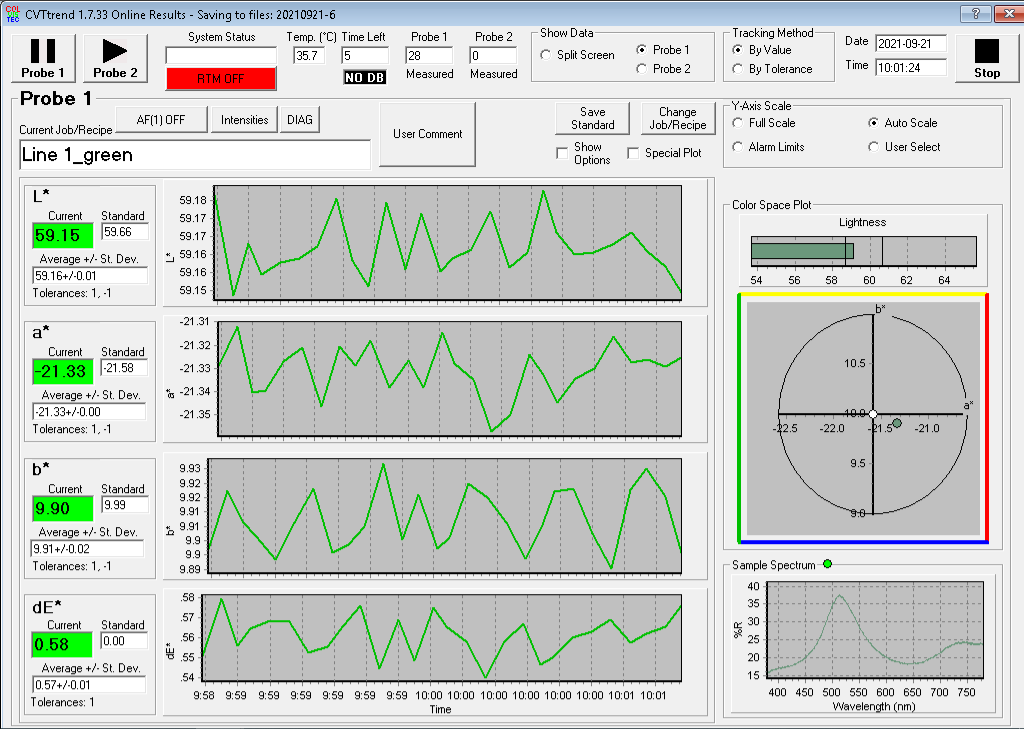
CVTtrend is our inbuilt inline process monitoring software that transforms raw, whole-spectrum transmission or reflection data into easy to interpret colour values in the CIE-L*a*b* 3D color space. Automatically detect and quantify the smallest variations in the color properties of your materials in real time.

With CVTtrend you can:

  • Monitor product color and quality continuously during production, without sampling or lab analysis — see L*a*b*, transparency, peak wavelength and other indices update in real time as material flows through the extruder, mixer, or line.
  • Catch deviations the moment they happen with on-screen warning and alarm limits, plus digital alarm signals sent directly to your DCS or PLC — so out-of-spec batches are flagged before they become scrap.
  • Integrate measurement data into your existing process control infrastructure via OPC UA, Modbus, analog and digital I/O — making spectral data available to MES, SCADA, and automation systems without custom development.
  • Maintain full traceability and compliance with automatic logging of every measurement, calibration, and user action — recipes, jobs, access levels and audit trails are managed in one place.
  • Extend CVTtrend with Residence Time Distribution (RTM) measurements — an optional add-on that lets you inject a tracer and record its passage through the process directly from CVTtrend, with manual or automated injection systems supported. For full analysis of the acquired data, pair it with ReTA, our dedicated Residence Time Analysis software.
  •     
    img

    img
         Residence (dwell) time destribution analysis software

    ReTA

    ReTA (Residence Time Analysis) is the dedicated companion software for the RTM add-on of CVTtrend. It takes the tracer concentration data captured during your residence time experiments and converts it into the quantitative descriptors process engineers and formulation scientists actually need — mean residence time, distribution statistics, dead time, mixing rate, percentile times, and fitted model parameters.

    With ReTA you can:

    • Combine repeated experiments into a reliable residence time distribution (RTD) by selecting which RTM segments to include in an ensemble — ReTA averages, smooths, and de-biases the data automatically, giving you a clean probability density and cumulative distribution function from runs that no single curve could deliver on its own.
    • Quantify your process with the indicators that matter — mean residence time, RTD standard deviation, skewness, excess kurtosis, Bodenstein number, and percentile times (T₁, T₅, T₅₀, T₉₅, T₉₉ and any user-defined value) — all computed and displayed in seconds from the same dataset.
    • Compare processes at a glance — different screw speeds, tracer loadings, formulations or scale-up trials can each be analyzed as a separate ensemble and overlaid in a single plot, making the effect of every process parameter immediately visible.
    • Fit established RTD models to your data, including the RPET13 convolution model (Gaussian transport × exponential mixing) developed for hot-melt extrusion — separating the “dead time” of pure transport from the mixing contribution, so you can attribute variability to its real source.
    • Export everything to Excel with one click — probability density, cumulative function, statistics, ensemble composition and full configuration are sent as labelled spreadsheets, ready for reports, regulatory documentation, or further analysis in your own tools.

    Inline spectra visualization and analysis software

    SpecViewer

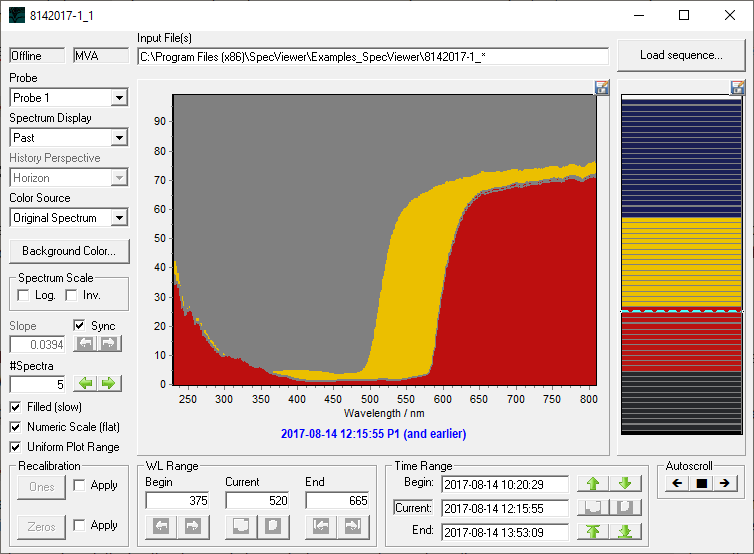
    SpecViewer is ColVisTec's dedicated tool for exploring the full sequence of spectra captured by InSpectro X or NIR, both during ongoing measurements and in archived datasets. Where other tools summarise spectral data into colour coordinates or trend curves, SpecViewer keeps the complete spectral information accessible, so you can investigate the spectroscopic fingerprint of your process at any time.

    With SpecViewer you can:

    • Follow your spectra live, or revisit them later — switch between online mode (updates from a running measurement, perfect for understanding a process while it happens) and offline mode (in-depth analysis of past datasets, with the full history available from the very first spectrum).
    • Navigate hours or days of spectra at a glance — the history bar shows the entire measurement timeline as a colour strip, where each band reflects the real colour computed from its spectrum, making process transitions, colour changes and anomalies immediately visible; jump to any point with a click, with arrow keys, or by user annotation.
    • Visualize spectra the way the question demands — view single or multiple spectra with linear or perspective (“horizon”) offset, filled curves, logarithmic or inverted scales, custom backgrounds, and tracking of average intensity over any selected wavelength range, single wavelength, or time interval.
    • Recalibrate entire datasets retroactively — if a measurement run was uncalibrated or used the wrong reference, select a new dark and/or white standard directly from the captured spectra; SpecViewer recomputes the full series on the fly, with an Apply toggle to switch between original and recalibrated data — invaluable for method development, dataset harmonization and troubleshooting.
    • Extract exactly the spectra you need — export selected spectra or full ranges as Bitmap, JPEG, GIF, Metafile, PCX images for reports, or as Text, XML, HTML or Excel for further analysis in your preferred tools, with optional wavelength headers and indices.

    SpecViewer works with InSpectro X and InSpectro NIR!

        
    img

    img
         Offline data visualization and analysis software

    RedLog

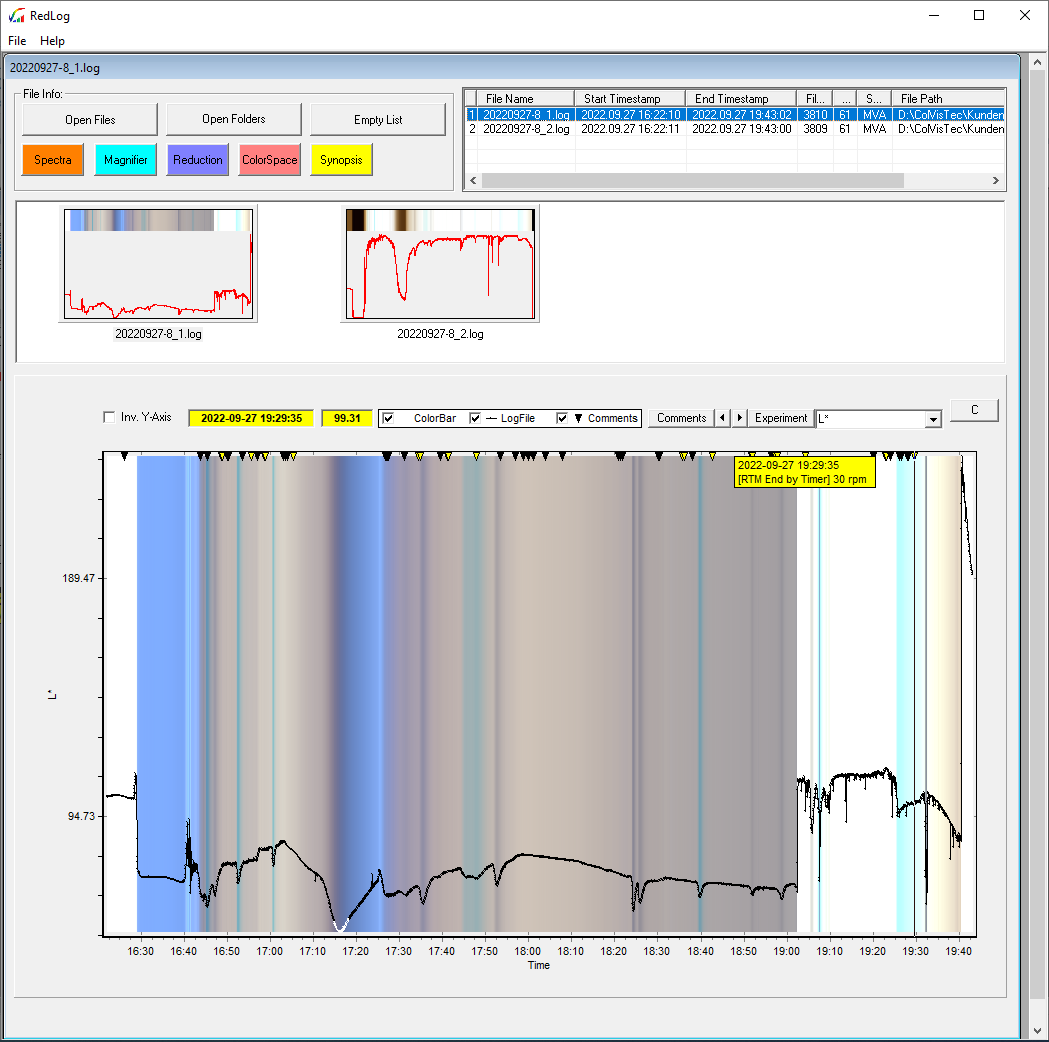
    RedLog is ColVisTec's dedicated post-process analysis software for the logfiles generated by CVTtrend during online measurements. It lets you reopen, review, compare and document any past run — from a single batch to months of archived data — with the visual and statistical tools that quality engineers, R&D scientists and production managers actually use to validate processes and answer questions about what happened on the line.

    With RedLog you can:

    • Reopen and navigate weeks or months of production data in seconds — load individual logfiles, entire folders, or whole archive directories, browse them through thumbnail previews and a sortable metadata table, and jump to any timestamp, comment, or RTM event without leaving the software.
    • Inspect the full spectrum behind every measurement, not just the L*a*b* values — overlay min/max/mean curves, plot reflectance or transmittance at a single wavelength over time (monochromatic mode), visualize tristimulus functions (X, Y, Z), and see the actual colour computed from each spectrum displayed in context.
    • Validate batches and process steps with on-the-fly statistics — use the Magnifier to zoom into any region of interest and compute mean and standard deviation of L*, a*, b*, C* and h over the selected interval, then save the results to a STAT file for traceability or further reporting.
    • Explore the colour space of a whole run visually — display measurements as 2D scatter plots, full 3D (L*, a*, b*) clouds, mosaics or histograms, with each point shown in its real measured colour — making formulation shifts, batch-to-batch variability and process drifts immediately visible.
    • Export complete batch reports to Excel with one click — measurement tables come pre-formatted with the real colour as cell background, RTM segments are exported as separate sheets with their own plots, and configuration data travels with the data — ready for QA documentation, customer reports, or regulatory submissions.

    Do you have any questions?